> For the complete documentation index, see [llms.txt](https://docs.petal.build/petal-pro-documentation/llms.txt). Markdown versions of documentation pages are available by appending `.md` to page URLs; this page is available as [Markdown](https://docs.petal.build/petal-pro-documentation/v2.2.0/fundamentals/layouts-and-menus.md).
# Layouts & Menus
## The layout component
Petal Pro gives the developer a `<.layout>` component, which takes a `type` attribute and renders a layout based on that `type`. eg:
```markup
<.layout current_page={:dashboard} current_user={@current_user} type="sidebar">
<.container max_width="xl">
content
```
It works by a simple case statement:
{% code title="layout.ex" %}
```markup
...
<%= case @type do %>
<% "sidebar" -> %>
<.sidebar_layout {assigns}>
...
<% "stacked" -> %>
<.stacked_layout {assigns}>
...
<% "public" -> %>
<.public_layout {assigns}>
...
<% end %>
...
```
{% endcode %}
You can maintain this file and add/remove layouts as you please.
### How to modify an existing layout
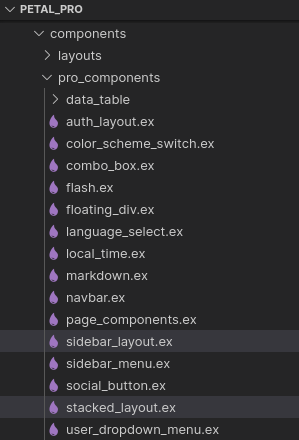
Petal Pro provides a number of layouts: "sidebar", "stacked" and "public". These are quite configurable however you may want to modify them. To do so, you can simply edit or duplicate the layout file in the following path:
```bash
/lib/petal_pro_web/components/pro_components
```
Here you can see the `sidebar_layout.ex` and `stacked_layout.ex` files.
### How to add a new layout
1. Copy `_web/components/pro_components/sidebar_layout.ex` , eg: `my_cool_layout.ex`
2. Review assigns and adjust your new layout - you can see in `layout/1` (`core_components.ex`) how menu items are passed in as well as the user's name and avatar
3. When complete, you can import your layout into `core_componets.ex` and modify the `layout/1` function - eg:
```markup
<%= case @type do %>
<% "my-cool-layout" -> %>
<.my_cool_layout {assigns}>
```
4\. Now in your template or live view file, you simply update the type to your new layout:
```markup
<.layout type="my-cool-layout" current_page={:dashboard} current_user={@current_user}>
<.container>
content
```
## Petal Pro Layouts
### Sidebar layout
This is the typical web application layout. It allows for a large number of menu items on the sidebar.
```html
<.layout current_page={:dashboard} current_user={@current_user} type="sidebar">
<.container>
content
```


### Stacked layout
A stacked layout with a navbar and then content.
```html
<.layout current_page={:dashboard} current_user={@current_user} type="stacked">
<.container max_width="xl">
content
```


### Public layout
Includes a header and footer - for use in public facing, marketing pages. The public layout is available in `router.ex` via the `:public_layout` pipeline:
```elixir
# Public routes
scope "/", PetalProWeb do
pipe_through [:browser, :public_layout]
# Add public controller routes here
get "/", PageController, :landing_page
get "/privacy", PageController, :privacy
get "/license", PageController, :license
live_session :public, layout: {PetalProWeb.Layouts, :public} do
# Add public live routes here
end
end
```


## Menus
In `menus.ex` there is a list of all the menu items. This can be useful when working with navbars and layouts, where you sometimes need to loop over menu items multiple times.
For all menu items, you must define a new `get_link/2` function, which takes a `name` and `current_user` as the parameters. The `name` parameter is pattern matched and thus you statically include it in the function definition. A menu item has a name, label, path and icon. Here's an example of a menu item for the "Register" menu item:
```elixir
def get_link(:register, _current_user) do
%{
name: :register,
label: "Register",
path: Routes.user_registration_path(Endpoint, :new),
icon: "hero-clipboard-list"
}
end
```
You can use the `current_user` param to conditionally display a menu item. For example, here we don't show the menu item unless the user is an admin.
```elixir
def get_link(:admin_users = name, current_user) do
if Helpers.is_admin?(current_user) do
%{
name: name,
label: "Users",
path: Routes.admin_users_path(Endpoint, :index),
icon: "hero-users"
}
else
nil
end
end
```
You can build menu item lists to give to layouts. We define the two core menu lists in `menus.ex`: